iPhone · in internal testing, not in the App Store

Memento mori.
Now wait.

Memento IF is a clock for the hours between your meals. It counts, it remembers, and it keeps quiet about the rest. No stages, no scales, no cheering. A skeleton sits at the table with you, and waits.

Example

An example on your local time: a 16:8, fasting from 20:00 to noon and eating from noon to 20:00.
1main screen
2kinds of reminder, both optional
10–24hours, the goal you choose
0accounts, stages or scales

One screen

Fasting, or eating.
One screen.

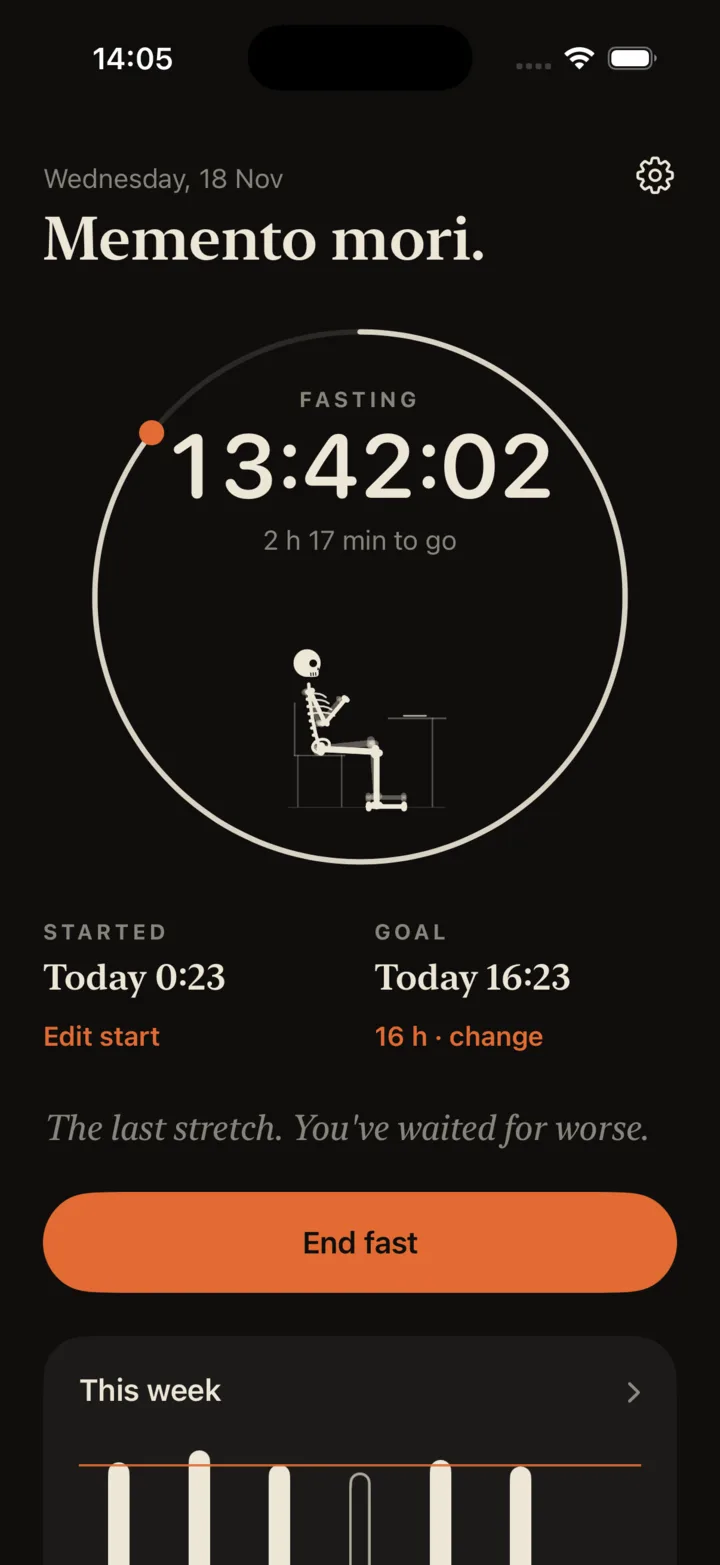
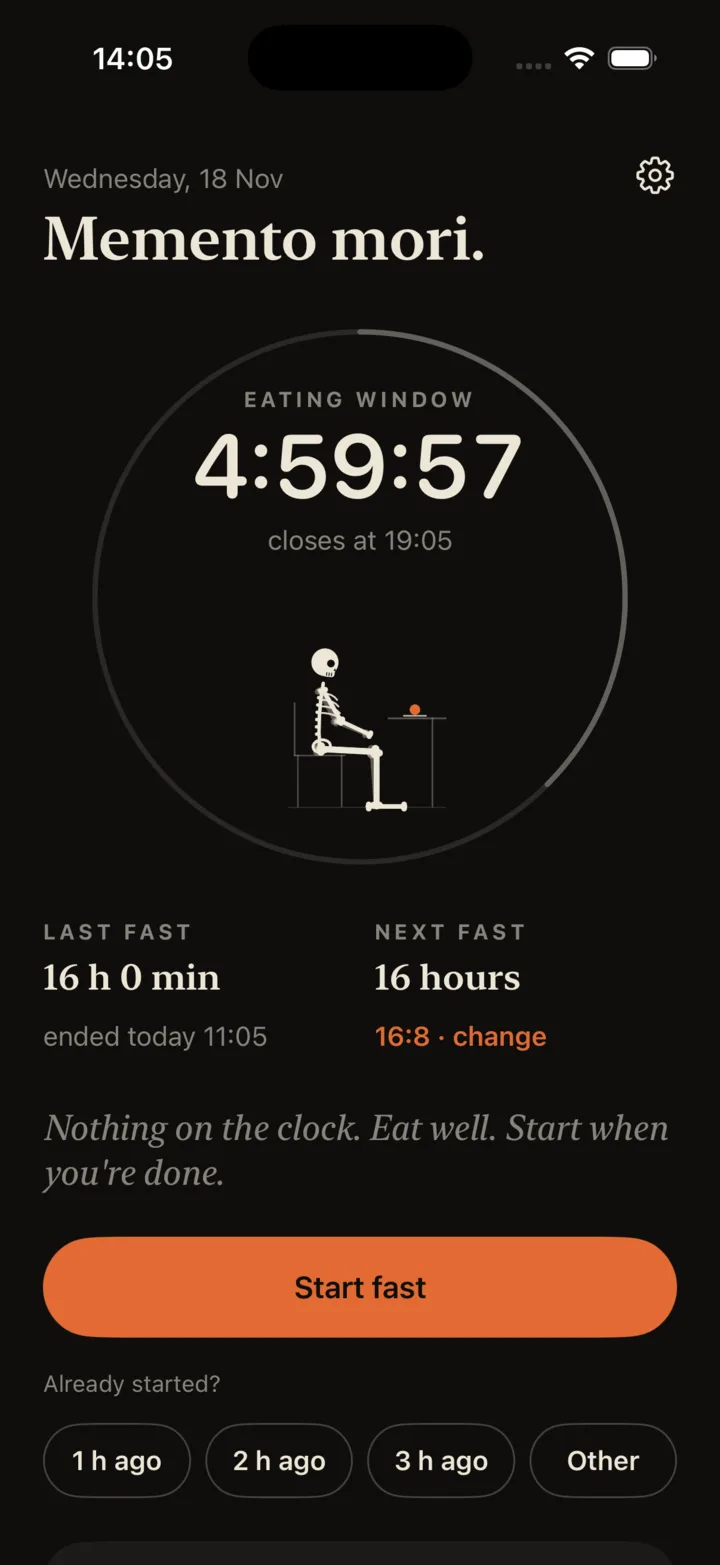
The same screen does both. While you fast, the ring fills toward your goal and the plate is empty. During an open eating window, the ring dims and fills as the window is used, the plate is served, and the clock counts down to when the table closes.

Fasting: 13:42:02 inside a ring, 2 h 17 min to go, the skeleton at an empty table. Started today 0:23, goal today 16:23, Edit start. The last stretch. You've waited for worse. End fast.
FastingThe ring fills. One quiet line about time.
Eating window: 4:59:57, closes at 19:05, the skeleton at a table with the plate served. Last fast 16 h 0 min, next fast 16 hours. Start fast, with 1 h ago, 2 h ago, 3 h ago and Other underneath.
EatingThe ring dims. The table is yours.
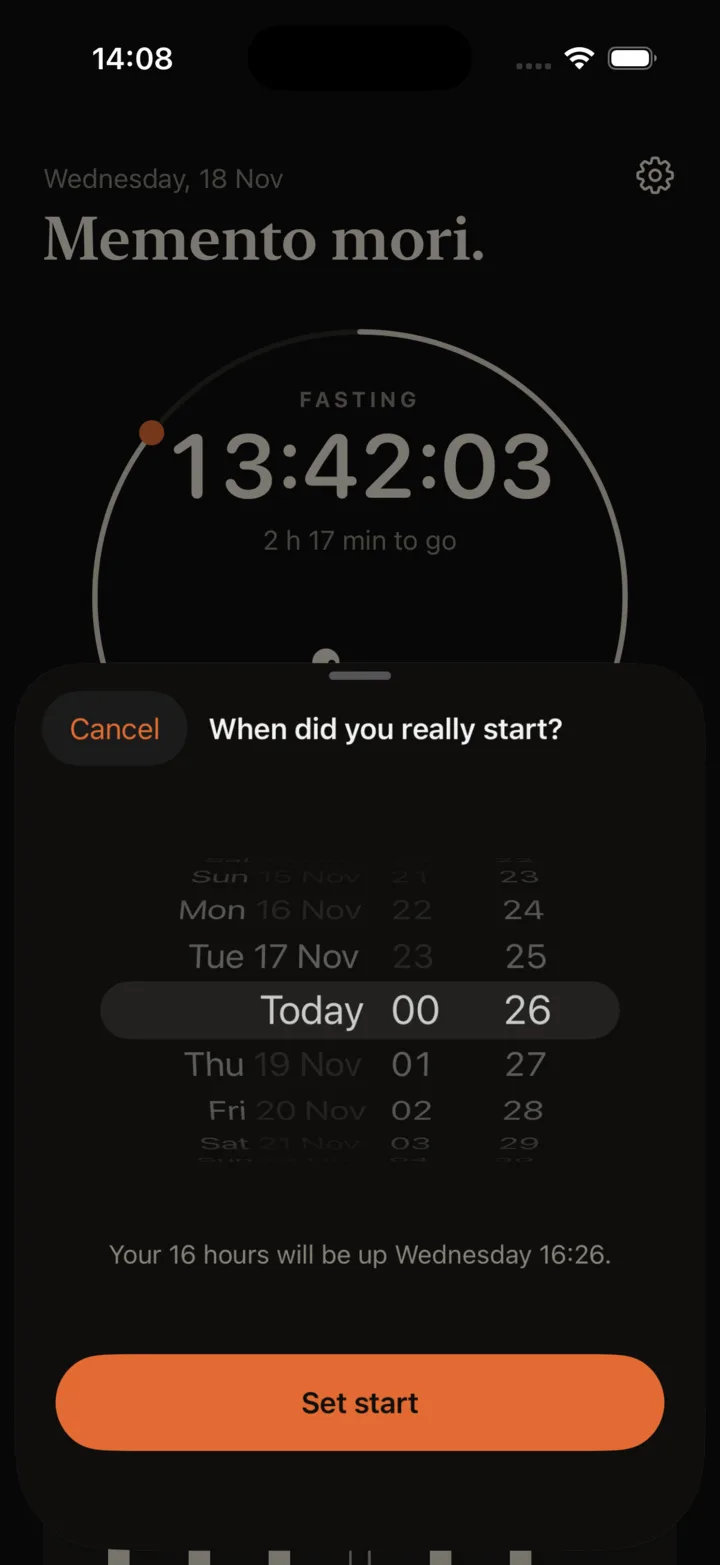
The When did you really start? sheet: a date and time wheel, and the line Your 16 hours will be up Wednesday 16:26

Your 16 hours will be up Wednesday 16:26.

Already started?

You started an hour ago. Say so.

Under the start button: 1 h ago, 2 h ago, 3 h ago, Other. Set the clock to when you actually started. While a fast is running, Edit start sits right under the start time.
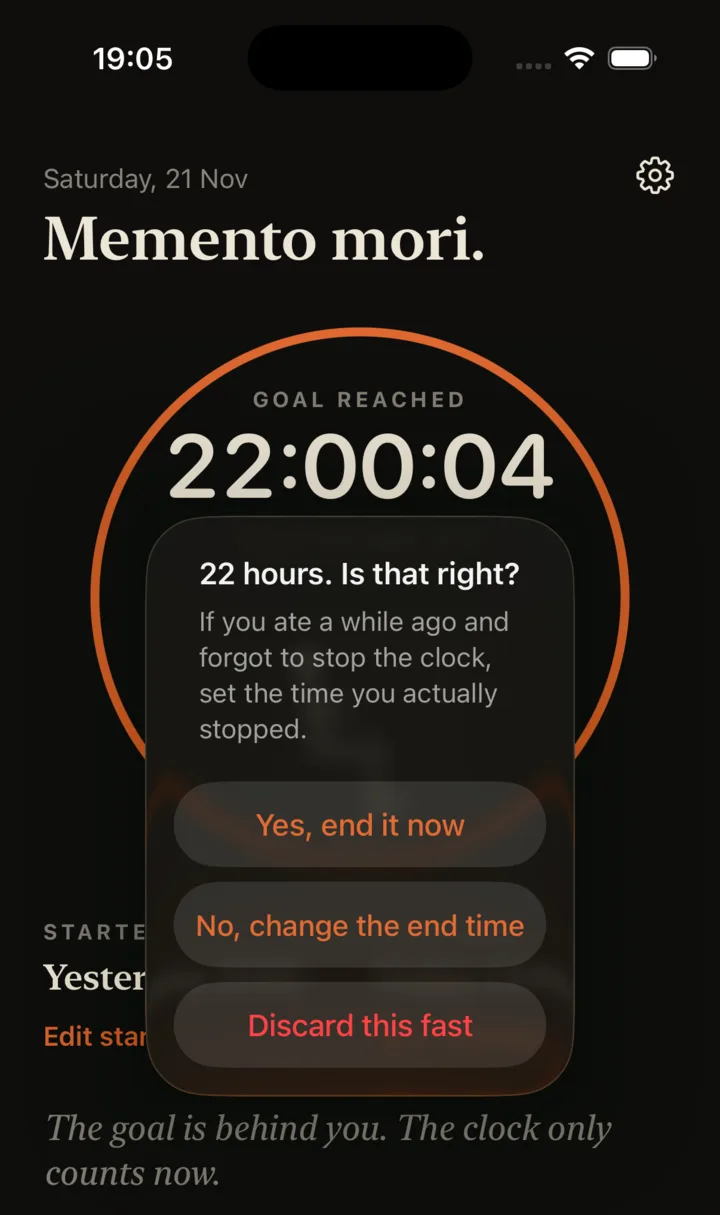
The question 22 hours. Is that right? with three buttons: Yes, end it now; No, change the end time; Discard this fast

22 hours. Is that right?

Forgot to stop?

It asks only when it should

Usually, End fast takes one tap and no questions. Only when a fast has run more than four hours past its goal does the button ask whether that is right, and let you set the time you actually stopped. Ending from a reminder on the lock screen never asks.

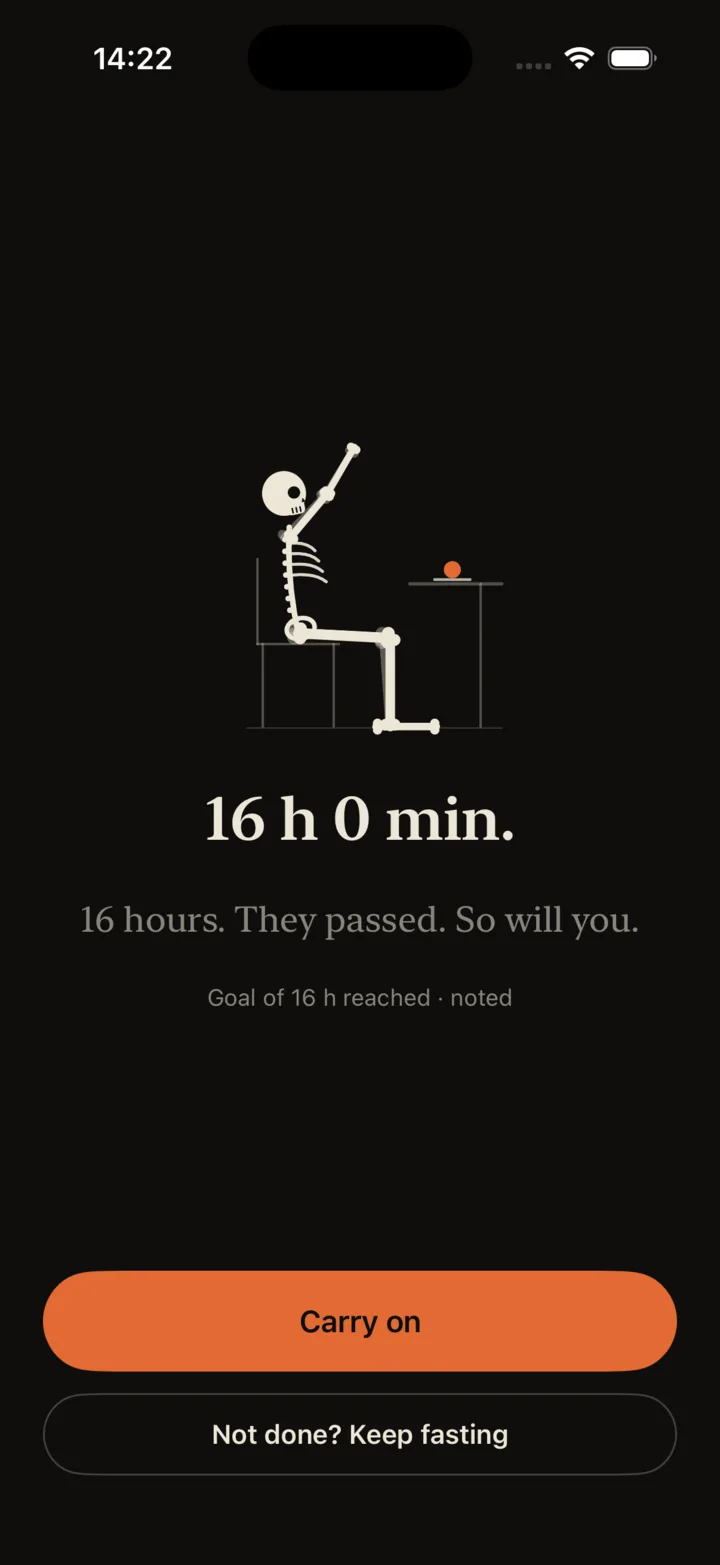
Done screen: the skeleton at its table, arms raised, the plate served. 16 h 0 min. 16 hours. They passed. So will you. Buttons Carry on and Not done? Keep fasting

16 hours. They passed. So will you.

The end of a fast

No trophy. Noted.

The length, one dry line, and on with your day. Ended it by mistake? Not done? Keep fasting, on the same screen, puts it back as if nothing happened. Under an hour is not logged: that was a pause.

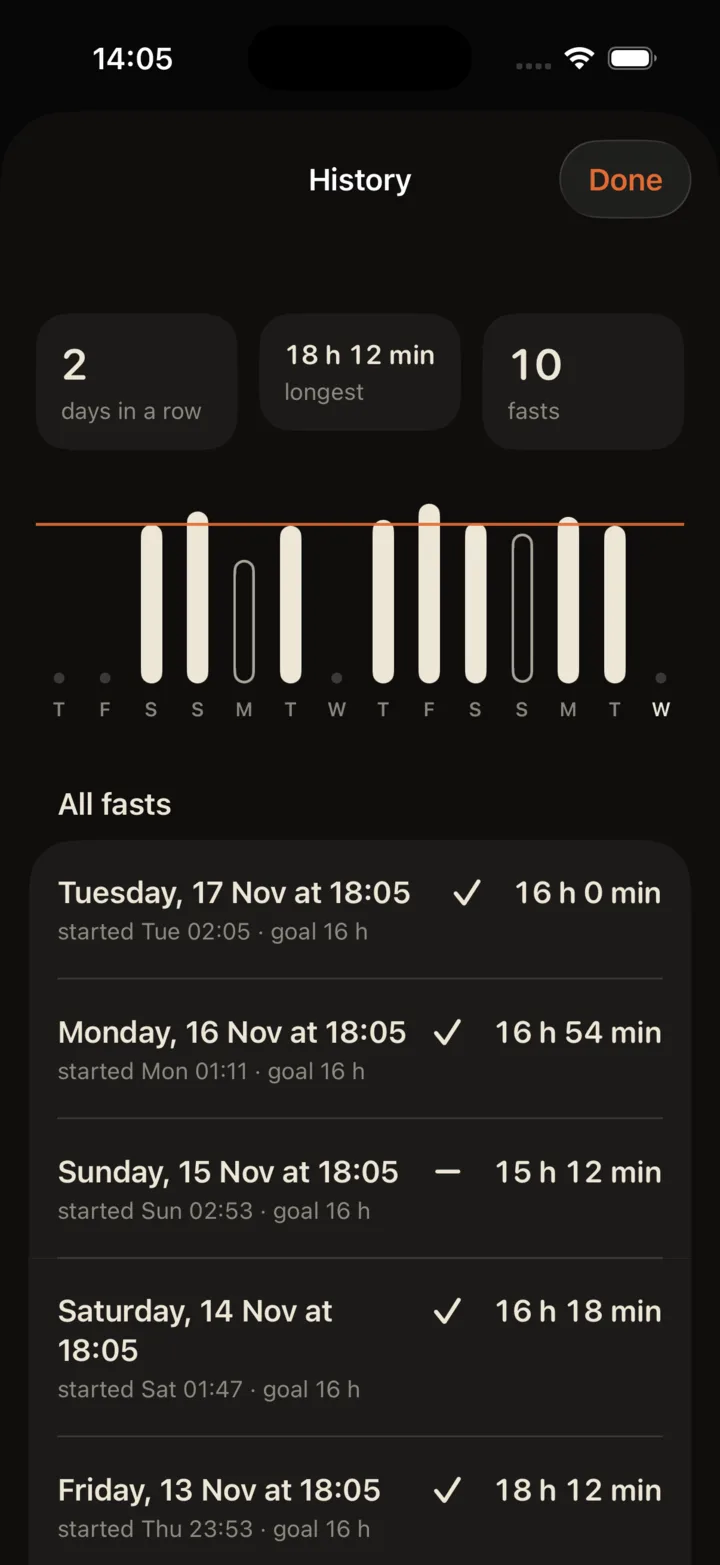
History: 2 days in a row, 18 h 12 min longest, 10 fasts, bars against a goal line, and the first rows of All fasts, each with its start, goal and length

Ended early. The clock keeps no grudges.

History

Bars against a line. That is all.

In the chart, each day shows the longest fast that ended on it against a line for your goal: a filled bar if that fast reached its own goal, an outline if not. In the list below, a tick or a dash says the same, so nothing is said with colour alone. A fast is never split at midnight.

How long

Five plans.
Or your own.

Choose a plan once. Change it whenever. A goal of your own runs from 10 to 24 hours, and the clock keeps counting after it.

  • 12:12Dinner to breakfast. Most of it asleep.
  • 14:10A late breakfast.
  • 16:8The common one. Skip breakfast or skip supper.
  • 18:6Two meals, close together.
  • 20:4A four-hour table.
  • OwnYour own number of hours.

What this app won't tell you

A clock, not a health app.

  • No stages

    Other apps show stages by the minute. Nobody can read that off a clock, so this one doesn't try.

  • No scales

    No weight, no calories, no before and after.

  • No cheering

    No confetti, no badges, no push to go longer.

  • No accounts

    Nothing to sign up for. The app sends no data anywhere by itself.

What the research says

Modest, and said plainly.

Some people find it simpler to eat inside a fixed window than to decide all day long. That is the whole case for a clock. Eating inside a time window has been tested in randomized trials, and the results are modest.

  • In a 12-week trial of 116 adults, eating only between noon and 8 pm did not lead to significantly more weight loss than three regular meals a day.

    Lowe et al., JAMA Internal Medicine, 2020

  • In a 12-month trial of 139 adults, adding an eating window to a calorie-restricted diet made no significant difference compared with the same diet alone.

    Liu et al., New England Journal of Medicine, 2022

  • A review of 11 meta-analyses, covering several kinds of fasting and not only daily eating windows, found some benefits for weight and blood markers, most of them resting on low-quality evidence, and called for longer trials.

    JAMA Network Open, 2021

Before you fast

Fasting is not for everyone.

  • Don't fast if you are under 18, pregnant or breastfeeding.
  • Don't fast if you have, or have had, an eating disorder.
  • If you have diabetes, take medicine that depends on meals, or have any medical condition: talk to your doctor first.
  • If you feel unwell, eat. The clock will forgive you.

The app shows this before the clock, and asks you to confirm you understand.

No account. Data stored on your iPhone.

The app sends no data to me or to anyone else by itself. Your fasts and settings are kept inside the app on your phone, with a copy of the last save in case the file is ever damaged. They may be included in a device backup or a transfer to a new iPhone, and you can save or share an export from Settings. No tracking, no ads. The privacy policy says exactly what is kept.

Questions

Asked, and answered.

Anything else is on the support page.

Can I get it?

Not yet. Memento IF is in internal testing on iPhone and is not in the App Store.

Which plan should I choose?

The app offers 12:12, 14:10, 16:8, 18:6 and 20:4, or your own goal from 10 to 24 hours. 16:8 is where it starts; it gives no advice about which suits you. The clock keeps counting past the goal, so a longer day is still counted.

Will it remind me?

Only if you allow them. If you haven't already answered the iOS notification prompt, it appears when you start your first fast. There are two kinds, each with its own switch in Settings: one when your hours are up, one when the eating window closes. Each has a button that ends or starts the fast without opening the app.

Do I need an account?

No. Your fasts are stored in the app on your iPhone. There is no sign-up, no analytics and nothing to log in to. Settings can export your fasts as a file, or delete what the app keeps.

Is this medical advice?

No. It is a clock. It does not know your health and it never tells you to keep going. If you feel unwell, eat.

Sixteen hours. They passed.
So will you.

iPhone · in internal testing, not in the App Store